
- Dream Palace Account Login Help (New Zealand)
- Logging in to an existing account
- Forgotten password
- Why login might fail
- Verification is not the same as login
- If your account has been restricted or suspended
- Keeping your login secure
- Self-exclusion and login
- Logging in from a mobile device
- Frequently asked questions
Dream Palace Account Login Help (New Zealand)
Availability note: Access from New Zealand may be limited depending on current regulatory status. If your account shows your location as unavailable, treat this as a genuine restriction.
Logging in to an existing account
If you already hold an account, the login window asks for two details:
- Enter your email in the Enter your email field. This is the email address linked to your account.
- Enter your password in the Enter your password field. Use the eye icon to check what you have typed before submitting, especially on a mobile keyboard.
- Select Login to submit the form.
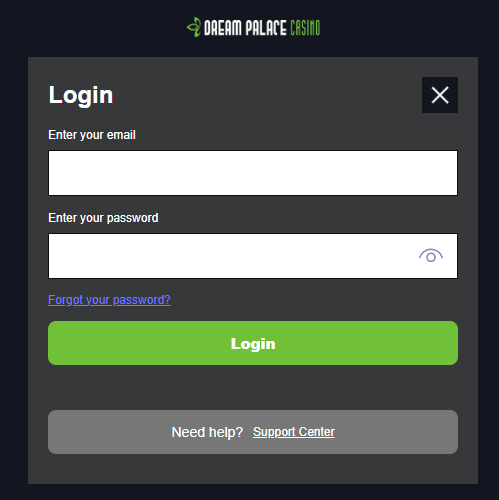
If access is refused, check what the error actually says before repeatedly re-entering different combinations of details, since repeated failed attempts can themselves trigger a temporary lock.
Do not open a second account because you cannot remember the details of an existing one. Standard casino terms typically restrict customers to a single account, and duplicate accounts can create further access problems rather than solving them.
Forgotten password
If you cannot remember your password, select Forgot your password? directly below the password field rather than guessing repeatedly. In general:
- Use the Forgot your password? link on the login form.
- Check the email account linked to your registration, including spam or junk folders.
- Avoid submitting repeated recovery requests in a short period, as this can delay resolution.
- If no recovery message arrives after a reasonable wait, use Need help? Support Center at the bottom of the login window rather than registering again.
Why login might fail
| What happens | Likely cause | What to do |
|---|---|---|
| Email or password rejected | Typing error, case sensitivity, or expired password | Re-enter carefully, then use Forgot your password? |
| No recovery email arrives | Wrong folder, or recovery request tied to a different email | Check spam, confirm the linked email address |
| Access restricted or account suspended | Verification, security or compliance action, not a password issue | Contact Support Center directly; do not reset the password expecting this to fix it |
| Identity or age verification requested | Standard KYC check, separate from your login credentials | Follow the instructions given for your specific account |
| You previously self-excluded | The block is intentional | Do not attempt to bypass it |
| Site or form will not load | Temporary technical or connectivity issue | Retry later or use a different browser before assuming your account is blocked |
Verification is not the same as login
Entering the correct email and password proves you know your own credentials. It does not automatically satisfy identity, age or eligibility checks that an operator may separately require. If you are asked to verify your identity, follow the instructions given for your account, and do not send identity documents to anyone who contacts you claiming to be support without confirming that request through official channels.
If your account has been restricted or suspended
Resetting a password will not usually undo a restriction placed for verification, security, self-exclusion or compliance reasons. Use the Support Center and ask specifically what needs to happen before access can be restored. Opening a second account is not a solution and can add further complications.
Keeping your login secure
- Do not share your password with anyone, including someone claiming to be support staff — legitimate support will not need it.
- Avoid saving your password in a browser profile that other people also use.
- Log out fully after each session, particularly on a shared or public device.
- If you believe someone else has accessed your account, change your password through the official recovery process and report it through the Support Center immediately.
Self-exclusion and login
If an account has been self-excluded, inability to log in may be intentional rather than a fault with the account or the site. Self-exclusion is designed to prevent access for the chosen period, and it will not lift itself early just because you try a different device or browser.
Do not attempt to open another account or work around the restriction. Information about limits, time-outs, self-exclusion and further support is available on the Responsible Gambling page.
Logging in from a mobile device
An existing account should not require a fresh registration simply because you are using a phone or tablet instead of a desktop. If you use the Dream Palace Casino App, sign in with the same email and password as on the desktop site. Otherwise, use the same login window on your mobile browser. If the process behaves differently, use Forgot your password? or the Support Center rather than registering again.
Frequently asked questions
What details do I need to log in?
Your email address and your password. Exact fields can vary by platform, so follow what is shown on the login screen itself.
What should I do if I’ve forgotten my password?
Select Forgot your password? on the login form rather than registering a new account. Check your spam folder if a recovery message does not arrive.
Can I open a second account if my old login doesn’t work?
This is generally not advisable and may breach standard account terms. Recover the existing account or contact the Support Center instead.
Why am I being asked to verify my identity even though my password is correct?
Login credentials and identity verification serve different purposes. A correct password confirms account access; verification confirms who you are, your age, or your eligibility, and may be requested independently.
Does resetting my password remove a suspension?
No. A password reset only addresses login credentials. A suspension linked to verification, security or compliance reasons usually needs to be resolved separately with support.
What if I think someone else has accessed my account?
Change your password as soon as possible through the official recovery process and contact the Support Center. Never send your password to anyone who contacts you asking for it.
Can I log in while self-excluded?
No — self-exclusion is designed to prevent access during the chosen period. See the Responsible Gambling page for support options.
Where can I get help with account access?
Use the site’s Contact Us page for account-specific issues. For information handling, see the Privacy Policy.
Go to Dream Palace Casino Login
Continue with your account details to reach the latest casino offer.

Bonus Offers This Month October 2026